Showing posts sorted by relevance for query review. Sort by date Show all posts

Enigmasoft v. Bleeping Computer - an unbiased review

As you may have heard, Enigma Software (enigmasoft) is suing computer help site Bleeping Computer for what is essentially a bad review.  The lawsuit alleges that many of the contributors knew that Bleeping Computer received affiliate money for recommending MalwareBytes, a competing program.  It further alleges that the reviewers on the site told people not to buy SpyHunter based on saying it had been classified as "rogue software" (which was once true) and that Enigma had been accused of misleading business practices (also true).  They further claim these issues had been resolved at the time of the review being published and the user who recommended MalwareBytes over SpyHunter based on this information he found on the Internet caused the company material harm in excess of $75,000.  I'm paraphrasing a little here, read the lawsuit to get all the details.

Enigma Software Website
I guess the only kind of bad publicity is no publicity at all.  I'll say that prior to this lawsuit, I'd never heard of Enigmasoft or their "flagship" security product SpyHunter.

HTTP login form? Seriously?!
One look at their website was more than enough to tell me that for a security company, they sure don't take security seriously.  The customer login form is available from an HTTP site.  When working with clients at Rendition Infosec, we sometimes see these forms redirect to an HTTPS site. But even then it isn't safe.  If a user connects to the form over HTTP, he could change the destination of the form or use JavaScript to steal the information before sending it to the original destination.

Even their dedicated login page at www.enigmasoftware/myaccount/ uses a POST to an HTTP site.  Any company should know better than this in 2016. But for a company that sells security software for a living, using an HTTP based login form is inexcusable.

Okay, HTTP logins... But how well does it detect malware?
Website aside, the SpyHunter software isn't particularly effective at detecting malware either.  I had several hundred malware samples on the virtual machine, ranging from the wiper malware that hit the Ukrainian power networks to some random stuff I downloaded months ago with maltrieve.  What were the detection results?  Not good.

SpyHunter can find cookies!
It turns out that SpyHunter can find cookies, particularly tracking cookies, like it's nobody's business.  It labels them as threats, which is arguably true.  Most people would probably prefer no tracking cookies be installed.  But would you pay to remove them when many free programs remove them too?  Of course not.  Shouldn't the SpyHunter program also find at least some of the well known malware on my machine too?  Of course it should.

No commission here
Let me be clear that I don't receive commission from any antivirus company for writing positive or negative reviews.  One of my Rendition employees took a look at the overall security of the SpyHunter program (stay tuned for more on that).

When it comes down to brass tacks, results are results.  My personal opinion is that if SpyHunter can't find well known malware, then it probably isn't worth paying for.

Is this a bad review?  Yep, damn skippy.  And well deserved too.  Is Enigma going to sue me for it?  I hope they know better.  This turtle says it better than I ever could...

Tecno Boom J7 First Impressions

Hey guys,
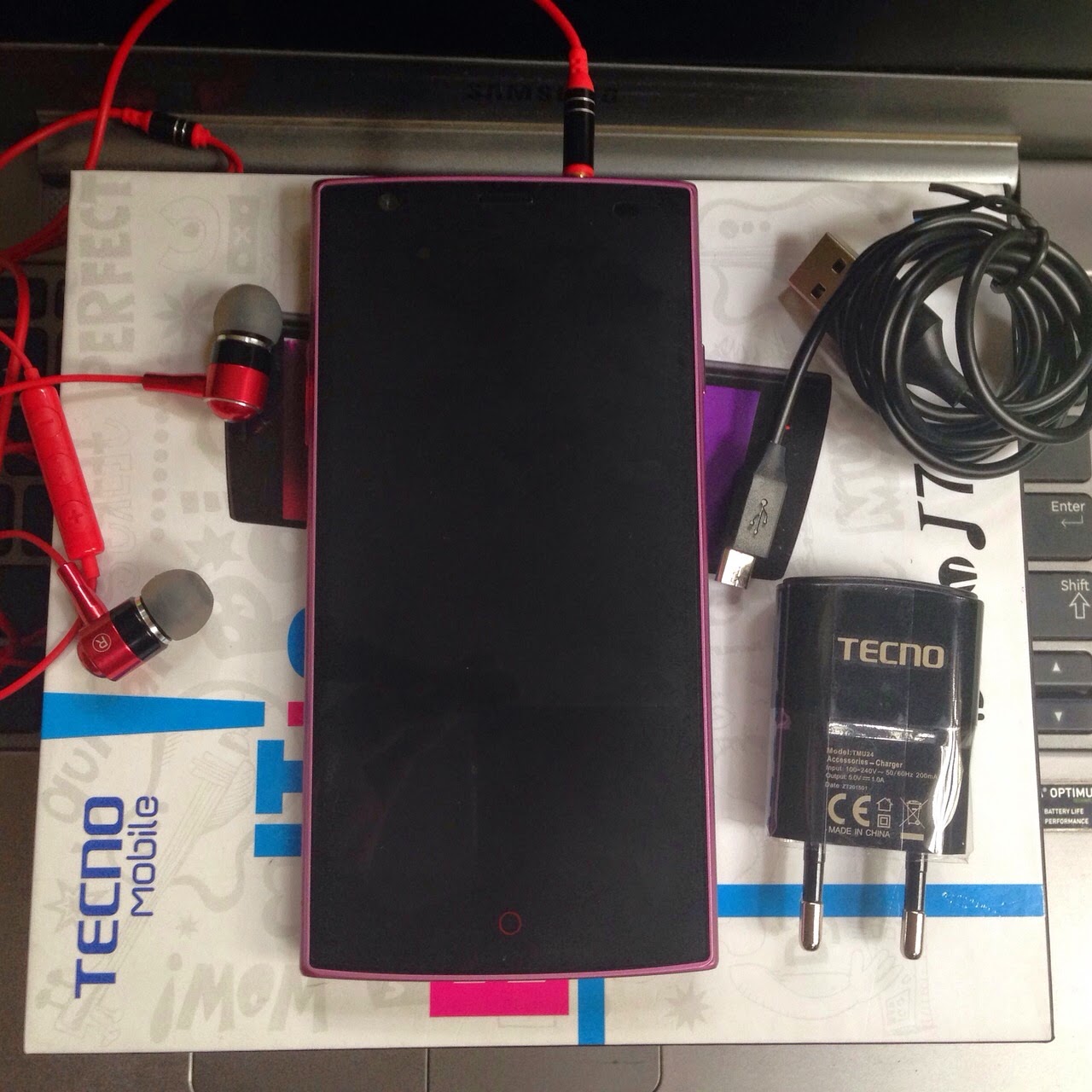
So the generous guys from Tecno thought it wise to consult my "expert" opinion on how they could reach you, the target market. I received a phone from Tecno at about 3pm yesterday and now I'm going to try to arrange my first thoughts and what I have observed within the first 24hours of using their latest midrange Smartphone, the Tecno Boom J7


Upon unboxing, I noticed that Tecno has taken a different approach with the color of its casing as it differs from that of its 2013 flagship, the Phantom A+, that I purchased way back when. The A+'s case was basically Blue and quite playful whereas the Boom J7's box is white and Black with music related artwork, which could mean that the J7 primarily caters to the music lovers. Inside the box, you have your Smart phone, a premium headset, 2 plastic protective cases(without a leather flip), A charger, the Battery and some literature booklets.
The spec summary;
 5.0" touchscreen display at 720 X 1280p (~294ppi)
8.0MP + 2.0MP primary and secondary camera
Dual sim, 1 Micro and 1 Normal sim (Both 3G capable)
2020mAh Li-ion battery - removable
Android KitKat OS 4.4
1.3Ghz Quad-core Processor
1GB Ram
16GB Rom (Internal Memory)


Took the liberty of attaching an unboxing video from the official tecno YouTube channel.

 The front face of the Tecno Boom J7 smartphone is an edge to edge glass i.e touchscreen and 3 soft touch buttons. 


At the top, you have the 3.5mm headphone jack.


At the bottom, you have the micro-usb port and microphone


At the left side, you have the volume rocker.


At the right side, you have your power button.


At the back, you have the raised camera and flash and a circular speaker that looks rather interesting.  The phone is pretty light weight due to the fact that the entire body is made of plastic however, it does have a nice grip to it and feels above average in terms of build quality.


The back is beautifully curved at the edges, which I don't think I've seen on another Tecno device yet.


Went ahead to pop the battery right in and turned it on.
I was outdoors when I did this, first off, fantastic sunlight legibility, zero glare and it also has the auto adjust screen brightness option.


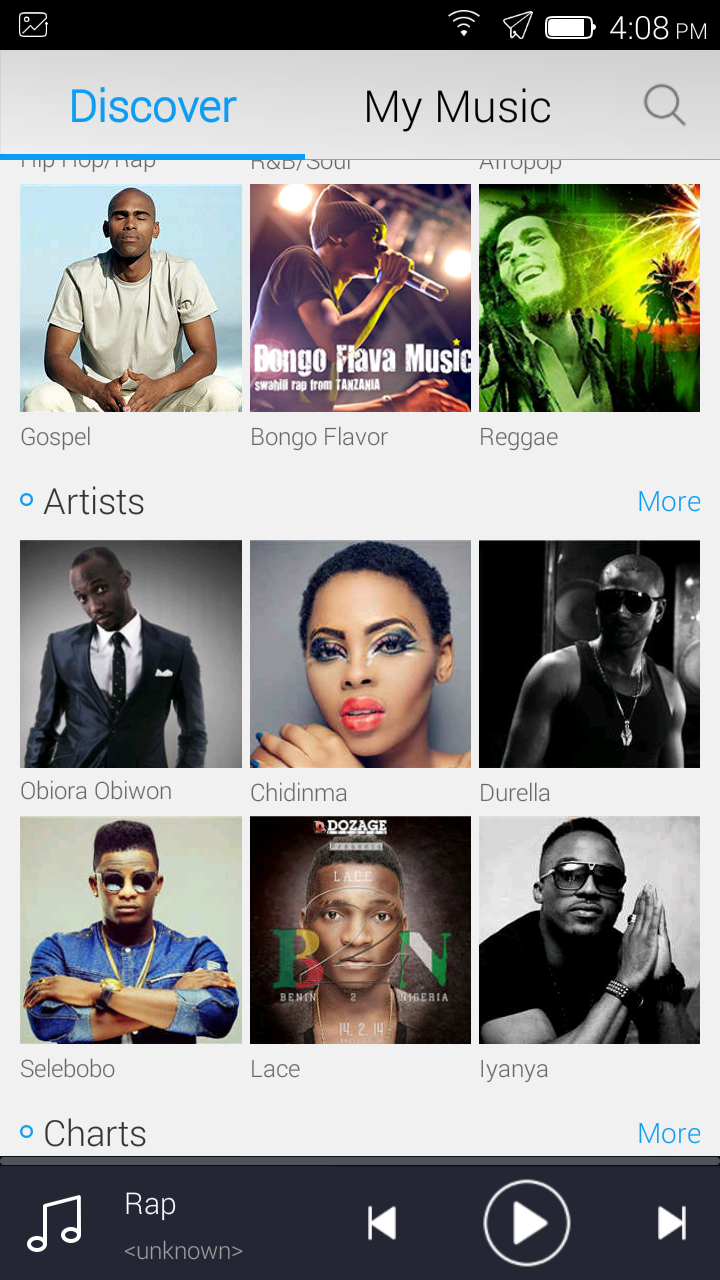
 The launcher (theme) is similar to what you have on the iOS devices. The icons are flat, and the toggles are even flatter. Nothing looks out of place if you're already used to the seamless android 4.4 KitKat user interface . There's also SwiftKey Keyboard pre-installed as well as other proprietary apps, a couple demo games and a new addition to the Tecno ecosystem, the Boom Player. I would explain how it works in my full review.


BOOM Player interface
Took some photos. Those turned out quite impressive especially because its an 8mp shooter and I know first hand that the 8mp snapper on the phantom A+ rarely takes crystal clear shots at first attempt. I would definitely be uploading more pictures and maybe a video sample on request, please let me know in the comment section.

Rear 8mp Camera of the Boom J7


Went ahead to plug in the headset and I realised afterwards that I couldn't hear much of what the Tecno rep before me was saying. It apparently, blocks you out from the background sounds and what not. He reiterated and said it was a noise cancellation premium headset. I would expatiate on this in my full review


Music Player Interface

Battery life so far....too soon to tell, only after 24hours of use with WiFi only. I charged it fully this morning and took it off its charger at 8am. Its 3:30PM now. I have downloaded & updated some apps. Spent  a little time on facebook, whatsapp, sent a few emails, taken a few pictures and generally fiddling with it for about 3 hours straight.
Meanwhile, I watched a full 1:30min movie  on flight mode last night and batt went from 100% to 78% (the 720p display delivered a satisfactory viewing experience). I haven't felt any heating or warming at the back yet.
There's also a power saving and Ultra mode which is proposed to squeeze some extra hours out of the battery life.


I'd definitely be putting the Boom J7 under more burden such as heavy gaming just to see how the li-ion battery holds up when compared to the polymer variant of the Phantom A+ in my full review. 

The tecno Boom J7 is already available in the market but the price varies from store to store. However, one of the lowest prices that I have seen is from Konga. As low as N23,999.
Click to buy now!
Feel free to hit the comment section if you have any questions or to let know what feature you would like me to write about extensively, in my forthcoming review.
What should CTI teams be telling leadership?

What should CTI teams be telling leadership?

In this post I want to address a problem that many CTI (Cyber Threat Intelligence) teams encounter on a fairly regular basis.  CTI teams rarely deliver good news.  After all, they are delivering information about cyber threats. The news is rarely great and in less enlightened cultures, it really isn't what leadership wants to hear.  At Rendition Infosec, we are regularly asked to sugar coat reports to make them more palatable to leaders.  Now I'm not one for FUD (fear, uncertainty, and doubt), but I'm also not one for ignoring the truth.  And often, unfortunately that truth is "we need help."  So in this post I'd like to address the question of whether it's better to tell them what they want to hear or sugar coat the truth.  To help illustrate the point, I'll use a CIA review of the book "What Stalin Knew" that I came across recently.  If you haven't read this review already, you should.

Tell them what they want to hear
Telling leaders what they want to hear is usually the easiest solution in the short term, but it can cause real problems in the long term.  "We're doing great on security and don''t have anything to worry about" is all fine and good until you have a security incident and have to explain why you were wrong (or deceitful).  However, this approach can increase liability if you are a contractor.  For internal employees, bear in mind that there are often sacrificial lambs brought to slaughter for every major security incident.  If your message is consistently "we're fine, don't worry" you may be that lamb.

Tell them what they need to hear
As pointed out in the book, this can get you killed while those who sugar coat the truth (or simply omit annoying facts) may prosper in your place.  Now you aren't likely to be killed for telling the truth, but you may not be promoted and might be marginalized in your existing position. If you are a contractor, you might not be invited to return.  But the good news is that this approach reduces liability and you'll probably sleep better at night doing it this way.

Take a blended approach
I personally think this is the best approach.  Executives and information technology professionals suffer under intelligence fatigue.  They need actionable intelligence to make decisions and operate effectively, but too much non-actionable information isn't a good thing.  At Rendition, we'll happily provide full details of all intelligence available as well as all recommendations for fix actions.  But we really prefer to focus on the top three to five threats and the top five to ten remediation actions.  We find that in numbers above these, we're really over saturating executives and exceeding the ability of IT organizations to take action on the remediation actions that are presented. We carefully work with the organizations to see their progressing in actioning the intelligence provided and then present the next most pressing threats and remediations.

What's the best approach?
What are your thoughts on the approach that CTI teams should take?  Continue the conversation on Peerlyst, leave a comment here, or hit me up on Twitter.

Cross posted from Peerlyst.

Security through obscurity isn't security at all

I just wrapped up a great few days at the EnFuse conference and I'm sitting in the airport waiting for my flight to board.  In the meantime, I started reading an application for a temporary restraining order (TRO) trying to prevent a researcher from obtaining details provided in an RFP to a public entity (Seattle Light).

Don't reverse engineer our device
The TRO, if granted, would restrict the release of an unredacted copy of the RFP data.  The company, Sensus, doesn't want their security controls known.  However, they apparently forgot that bidding on a public contract where those details were part of the RFP would expose them to release.  If public money is being spent on the devices (and it is) and the public will be forced to use the devices (they will) then the public should have the opportunity to evaluate the security of the devices.

However, in it's plea to the court, Sensus makes it clear that one of their fears is reverse engineering of the devices.  


Secure encryption
But the real issue is that Sensus apparently believes that encryption can only be safe if nobody can examine it.  Consider this excerpt:


I suspect that at first glance this makes sense to some.  But of course we know that encryption is only safe when exposed to public review.  And even then, it may still contain vulnerabilities.  This statement alone puts Sensus in a delicate position to defend later.  The Sensus VP makes a declaration under penalty of perjury that releasing this data to the public would create a risk to cyber security since an attacker would compromise their encryption data.  

But if that's really the case (and not just hyperbole) then Sensus' encryption is fundamentally broken.  Another possible  option is that the Sensus' encryption deployment is completely secure but their VP simply doesn't understand what he's talking about.  Admitting that however would put Sensus in a delicate position since it would call into question the rest of their claims. 

Chilling effects
Finally, Sensus threatens that this required disclosure will have a chilling effect on it's participation in the public marketplace.  Sensus says that if they are required to disclose RFP submissions for public review, they will either withdraw from the market or charge a substantial premium to compete in it.


Honestly, neither of these options sounds that bad to me.  If Sensus removes itself from the public AMI market because their devices cannot withstand public security, we are probably all better served as consumers.  If Sensus imposes a substantial premium in its bids (as threatened) this isn't bad either.  Other companies who are not afraid of public security will step in to fill the void and again the public is better served.

Independent security evaluations
Just as the fox can't guard the henhouse, the engineers who build a product can't be responsible for evaluating its security.  Independent security evaluations are required, particularly before your devices and designs are subject to public scrutiny.  Rendition Infosec performs a number of these evaluations annually and we regularly find that engineers build products with what they were taught to be "best practices" that are in fact fundamentally insecure.  While the engineers say the product was built using the best the industry has to offer, security simply isn't understood.  Absent independent reviews, we all suffer.


Sony Xperia X Review. What's Pros, Cons & Specs.

सोनी एक्सपिरिया X आपको पेश करता है स्मूद, चिकनी बनावट, शानदार डिस्प्ले, अच्छी परफोर्मेंस और सक्षम बैटरी लाइफ वाला स्मार्टफोन. लेकिन इसका कैमरा उतना अच्छा नहीं है जैसा कि सोनी के ब्रांड के साथ उम्मीद की जाती है.

हमारा फैसला


सोनी एक्सपिरिया X में एक अच्छा डिस्प्ले, अच्छी बनावट और शानदार परफोर्मेंस और बैटरी लाइफ मौजूद है. लेकिन यह फ्लैगशिप क्लास का नहीं है. अगर देखा जाये तो 48,990 रूपए में आपको इससे बेहतर ऑप्शन मौजूद मिलेगा.

सोनी Xperia X Dual सिम: Detailed Review

सोनी ने जब मोबाइल वर्ल्ड कांग्रेस (MWC) 2016 में अपने नए फ्लैगशिप सोनी एक्सपिरिया X के बारे में घोषणा की और उसमें नए फीचर प्रीडिकटिव हाइब्रिड ऑटोफोकस (PHAF) के साथ पेश करने की घोषणा की, जिसे लेकर सभी काफी इक्साइटड थे. आखिरकार सोनी ने अपने कैमरा को बेहतर बनाने का सोचा. कंपनी का दावा है कि यह आपको DSLR कैमरा सेंसर का 42 प्रतिशत तक देगा और सोनी के सेंसर द्वारा स्मार्टफोन 36 प्रतिशत तक देगा.
इसके अलावा कंपनी ने फोन के डिज़ाइन और ओवरऑल एर्गोनोमिक बनावट पे ध्यान देते हुए कुछ बदलाव किया है. अगर कहा जाये तो सोनी एक्सपिरिया X नए फ्लैगशिप स्मार्टफोन की तरह नहीं है.
कैमरा
सोनी एक्सपिरिया X में 23 मेगापिक्सेल कैमरा एक्स्मोर RS मोबाइल इमेजिंग सेंसर, साथ में RGBW पिक्सेल, f/2.0 सोनी G लेंस और ज्यादा फोकस पॉइंट के साथ प्रीडिकटिव हाइब्रिड ऑटोफोकस दिया गया है. इसका मॉडल नंबर नही दिया गया है. लेकिन उम्मीद की जा रही है कि सोनी के एक्सपिरिया Z5 में अपग्रेड की गई होगी. इसका इमेज क्वालिटी अच्छी है.
Pawan Ojha Tech
Taken From Sony Xperia X
एक्सपिरिया मैन्युअल शूटिंग एडजस्टमेंट, साथ ही वाइट बैलेंस, सेंसिविटी और मल्टीपल मोड के साथ उपलब्ध है. इसके इमेज क्वालिटी की अगर बात करे तो सोनी एक्सपिरिया X कलर्स के साथ अच्छा बैलेंस करता है. प्रीडिकटिव हाइब्रिड ऑटोफोकस फिचर स्मार्टफोन में नया फिचर जोड़ा गया है. सोनी ने जैसा कि दावा किया था कैमरे में उतना फोकस नही दे पाया. कैमरे का फोकस फ़ास्ट नहीं है. इसका शटर रेस्पोंस और प्रोसेसिंग ढीला है. ये नई टेक्नोलोजी तब ज्यादा प्रभावशाली होती अगर कैमरा, ऑप्टिकल इमेज के साथ संतुलित होता. जो कि एक्सपिरिया X में कही गुम है.
Pawan Ojha Tech
Taken From Sony Xperia X
तेज रौशनी में इसका कैमरा अच्छा काम करता है. इसके तस्वीर एप्पल आईफोन 6s प्लस और सैमसंग गैलेक्सी S7 एज मिलती है. कम रौशनी में एक्सपिरिया X का कैमरा मुश्किल से ही पास हो पता है. सोनी ने अपने नए फोन में कम रौशनी में बेहतर काम करने के लिए 13 मेगापिक्सेल एक्स्मोर RS कैमरा मोड्यूल दिया है, लेकिन कही कही कैमरा फोकस करने में संघर्ष करता है. सोनी का मेजर फोकस कैमरे में कम रौशनी में बेहतर परफोर्मेंस देना है इसके अलावा फ़ास्ट फोकस करने में.


बनावट और डिज़ाइन
सोनी ने अपने नए फ्लैगशिप में एक और हिस्से में बदलाव करते हुए उसके बनावट और डिज़ाइन में फोकस किया है. और जो कि कैमरे से ज्यादा बेहतर है. स्मार्टफोंस में 5-इंच की फुल HD डिस्प्ले दी गई है, जिसका रेजोल्यूशन 1080x1920 पिक्सल है. इसमें दायें तरफ फिंगरप्रिंट सेंसर, जो कि पावर बटन के साथ मौजूद है. अगर आप सोनी एक्सपिरिया XA और खास तौरपर  XA अल्ट्रा को ध्यान से देखोगे तो आप खुद ही इसके डिज़ाइन में हुए बदलाव को समझ जायेंगे.
Pawan Ojha Tech
हालांकि सोने ने अपने नए फ्लैगशिप के डिज़ाइन में बदलाव किया है लेकिन उसने अपने ओरिजनल डिज़ाइन के उसूल को ध्यान में रखा है. सोनी ने अपने फोन में हार्ड मेटल और ग्लास ट्राई नही किया है, जबकि इसमें स्मूद कर्वड ग्लास के साथ किनारों में मेटल का प्रयोग किया है. और इसका मैट प्लास्टिक बैक हाथ में फोन को लेने के बाद अच्छा अनुभव देता है. इसके बटन सोनी के पुराने डिवाइस की तरह ही सेट किये गए है. लेकिन इसके पॉवर बटन को प्रेस करने के लिए ज्यादा मेहनत करनी पड़ती है.
Pawan Ojha Tech

डिस्प्ले और UI
एक्सपिरिया X का 5 इंच का फुल HD पैनल साफ़, क्रिस्प और शानदार है.  इसका डिस्प्ले पर्याप्त मात्र में तेज और दिखने में खास है. ये डिस्प्ले में मौजूद कलर के ब्लैक और वाइट शेड्स को अच्छा लुक देता है. सोनी TRILUMINOS टेक्नोलोजी का प्रयोग करता है. और इसमें मूवी और गेम्स खेलते वक्त इसका डिस्प्ले कलर शानदार अनुभव देता है. इसका टच ब काफी स्मूद और हल्का है. सोनी के एक्सपिरिया UI एंड्राइड मार्शमेलो के साथ काफी अच्छा और स्मूद अनुभव देता है.

सोनी ने अपने डिस्प्ले में एक नए फीचर को एड किया है जो कि लाइव वॉलपेपर है. लेकिन वो वॉलपेपर बहुत ज्यादा प्रभावनीय नही है.
परफोर्मेंस
एक्सपीरिया X में क्वालकॉम 650 प्रोसेसर मौजूद है. एक्सपीरिया X स्मार्टफोन का डाइमेंशन 143.7x70.4x8.7mm और वजन 164 ग्राम है. इनमें 32GB की इंटरनल स्टोरेज भी दी गई है, जिसे माइक्रो-SD कार्ड के जरिए 200GB तक बढ़ाया जा सकता है. इसका गेमिंग परफोर्मेंस बहुत अच्छा है. फोन में गेम खेलते वक़्त फोन की परफोर्मेंस अच्छी और स्मूद रहती है. इसका प्रोसेसर अच्छे से काम करता है खासकर तब जब आप सोनी के प्रीडिकटिव हाइब्रिड ऑटोफोकस का प्रयोग करता है. इसकी गेमिंग परफोर्मेंस भी काफी बढ़िया है. स्मार्टफोन अच्छा काम करता है साथ ही यह आपके सभी ब्राउसिंग, सोशल मीडिया, कॉलिंग, टेक्स्ट, मेसेजेस, स्ट्रीमिंग और गेमिंग का ख्याल रखते है.
आगे इसके ऑडियो की बात करे तो सोनी ने अपने स्मार्टफोन में Hi-Res ऑडियो टेक्नोलोजी को शामिल किया है और इसकी ऑडियो साउंड भी काफी अच्छी है. सोनी एक्सपिरिया X का इंटरनल स्पीकर इसके दुसरे कैटेगरी में से सबसे बेस्ट है.
बैटरी
इसमें 2620mAh बैटरी दी गई है. फोन की बैटरी हमारे बेंचमार्क टेस्ट में 10 घंटे तक चली. लेकिन सही में देखा जाये तो यह फोन पूरे दिन चल सकता है. यह फोन नॉर्मली  आम 2 घंटे तक चल सकता है. इस्तेमाल में यह एक दिन तक चल जानी चाहिए. कुल मिलाकर एक्सपीरिया X अपनी कीमत वाले अन्य हैंडसेट की तरह एक बेहतरीन परफॉर्मर नहीं है. ऐसे में हमारे लिए 48,990 रुपये की कीमत में इस फोन को लेना सही नही है.
निष्कर्ष
सोनी एक्सपिरिया X में एक अच्छा डिस्प्ले, अच्छी बनावट और शानदार परफोर्मेंस और बैटरी लाइफ मौजूद है. लेकिन यह फ्लैगशिप क्लास का नहीं है. अगर देखा जाये तो 48,990 रूपए में आपको इससे बेहतर ऑप्शन मौजूद मिलेगा. कुल मिलाकर एक्सपीरिया X अपनी कीमत वाले अन्य हैंडसेट की तरह एक बेहतरीन परफॉर्मर नहीं है. ऐसे में हमारे लिए 48,990 रुपये की कीमत में इस फोन को लेना सही नही है.

Automotive ISAC cybersecurity recommendations

On Thursday the automotive ISAC released recommendations for increasing automotive cybersecurity.  What can we learn from this?  A lot it turns out - some good, some bad.  It turns out that automotive cybersecurity isn't much different from cybersecurity anywhere else, so these recommendations are pretty universally applicable.

I'll focus mostly on section 4.0, titled "Best Practices Overview."  The document focuses on a number of high level items, including:

  1. Governance
  2. Risk Assessment
  3. Security by Design
  4. Threat Detection and Protection
  5. Incident Response and Recovery
  6. Training and Awareness

I'll probably do some follow up posts, but for the moment the ones I want to focus on most are Security by Design and Threat Detection and Protection.  Both of these contain very solid advice for most organizations, automotive or not.  For instance, Security by Design focuses on the following areas:


None of these are bad and in fact few organizations I work with are considering all of these points.  But the number one thing I see missing here is the lack of any recommendation/requirement for third party security testing.  Ask a developer if they've written secure code and you know what answer you're likely to get.  Internal testing teams are often incentivized to not make waves when reporting vulnerabilities.  Even when there's no pressure, they often operate in an echo chamber and that's no good.  Outside testers bring experience from other industries and manufacturers to bear against your product.  And they're much more likely to bring the skills that real testers (i.e. hackers) will bring to your product later.

As for Threat Detection and Protection, the outlook is a little better.


Not surprisingly for an ISAC, we see the recommendation to report threats to appropriate third parties.  This is a good recommendation in general and totally self serving for an ISAC.

But my favorite recommendation here is to identify how to manage vulnerability disclosure from third parties.  Entities outside the organization can and will discover vulnerabilities in our products.  If the security department can't effectively deal with these disclosures, we are doomed to fail.  I have multiple recommendations that I share with Rendition Infosec customers, including:

  • Ensure that you have a security reporting point of contact on the website
  • Operators who answer the general "contact us" phone and email must know where to route security inquiries
  • Once the security department is notified, they should engage public relations 
  • Develop a timeline for response and communicate that timeline with the entity reporting the vulnerability
  • Stick to the developed response/remediation timeline. If deviations are a must, clearly communicate that with the submitter.

This isn't a comprehensive list, but will get you a long way towards good.

I'll leave this here for now.  Let me know on Twitter or in the comments if there's interest in more review of this document and I'll post a follow up.  Overall, we should commend the Automotive ISAC for their security processes.

PayWithCapture Review

        PayWithCapture is an application powered by Access Bank that allows you to purchase item by scanning the item’s QR code with your smartphone’s camera. You can also top up your airtime with this incredible application.
       It is a new way of paying for items if you didn’t have any money or your debit card with you and the application is available on Android, Blackberry and iOS devices which you can download through any of the links below according to the device you are using:
  • For Android, click here
  • For Blackberry, click here
  • For iOS, click here
       When signing up on the application, it will require you to put in a referral code. You can put this Referral code: KFKBJ7 and earn 500 loyalty points which can be applied when paying for discount.
       PayWithCapture can be easily used by following these three steps:
  • Link a credit/debit card, a bank account or a mobile money account to PayWithCapture. You only need to do this once.
  • Scan a payment QR code on a merchant website, a checkout station or even printed on paper and pasted on the wall or the checkout counter.
  • Confirm the amount and then pay.
       According to the official website of PayWithCapture, there are a lot of features and benefits both for the costumers and merchants:

       To costumers: “It does not cost you money to use PayWithCapture®. It is both free to use and free to download. PayWithCapture® makes it possible to pay for goods and services perpetually because there are no charges for using PayWithCapture and no monthly fees are incurred for using PayWithCapture®. PayWithCapture is available for iOS, Android and Blackberry 10 devices.”

       To merchants: “PayWithCapture® for merchants is a cutting-edge solution that works both offline and online. PayWithCapture provides an alternative payment method for merchants and improves security by eliminating the need to store large amounts of cash. PayWithCapture® is very easy to use and setting up only takes a few minutes. No cumbersome numbers to remember or convoluted processes to adhere to. The QR Code works even printed on paper, so all you may ever need to do is to print the QR code and have it pasted on the checkout counter!”
       You can get more information about this amazing application from PayWithCapture.com and remember to use KFKBJ7 as your referral code to get 500 loyalty points.

The USG backdoor definition double standard - Juniper vs. Apple

The USG backdoor definition double standard - Juniper vs. Apple

I wanted to make another quick point in the FBI vs. Apple debate that I haven’t yet heard anyone else make.  Fancy that – I’ve had an original idea.  There are two key points to keep in mind as we begin this discussion:
  1. The FBI keeps saying that they aren’t looking for a backdoor.  The FBI just needs a capability that intentionally weakens security features in a product made by a US manufacturer.  
  2. The FBI wants Apple to weaken the security of the iPhone in question for the purposes of intelligence collection. Recall that this is not a law enforcement matter (the suspects are dead).
My memory is sometimes a little short, but I seem to remember a few months ago when it was discovered that an unknown actor placed a crypto backdoor in the Juniper code base.  I'm not talking about the SSH backdoor (CVE-2015-7755), I'd like to intentionally remove that from the debate.  But for the crypto backdoor (CVE-2015-7756) I see an obvious parallel.

Let's review the facts about the Juniper crypto backdoor:
  1. The software weakened security features designed to protect customers who used the device. But it definitely wasn't a backdoor because it didn't directly allow the unknown party access to the device.
  2. Though we don't know who planted the software, it is almost universally agreed upon that it was placed by a nation state for the purposes of intelligence collection.
When comparing these two points looking for similarities, the FBI was drawing a blank. So I brought in Ray Charles to take look and even he can see that there's a clear parallel here.

Okay, so the first point is ridiculous.  You can't seriously say that the Juniper software wasn't a backdoor.  It was an encryption backdoor.  It allowed an attacker to reveal data that customers wanted to keep secret.  In fact, they bought the Juniper devices specifically to keep their data protected from unauthorized viewing.  Then an unknown party put a backdoor in the software for the purposes of enabling intelligence collection.  

I seem to remember some people being really mad about this, including many of our elected representatives.  In fact, congress wants answers about the Juniper backdoor.  I'm really curious why so few elected officials are being vocal about the FBI order to Apple.  If an unknown attacker had the same capability that FBI is asking for, they almost certainly wouldn't be silent.  If China drafted a court order to get an iPhone backdoor, um I mean intentional software weakness, the US certainly wouldn't be silent.  This is a double standard of language if I've ever seen one.

Getting ready for Badlock

There's no shortage of speculation on what the Badlock vulnerability will hold in store for organizations when the patch is released this Tuesday.  The vulnerability's discoverer posted on Twitter that the vulnerability will give administrator to anyone on the network (though the tweet was subsequently deleted).

What does this mean?  Does the vulnerability require authentication or can an anonymous user exploit it?  This answer alone will help drive how dangerous the vulnerability is.  Also, does remote code execution occur or is this simply a privilege escalation vulnerability?  Privilege escalation would be bad, but remote core execution would mean that with anonymous access, Badlock could be wormable.  Bad stuff for sure.


What will Badlock impact?
Badlock will impact both Windows and Samba both of which use the SMB protocol.

How long will it to develop an exploit after the patch is released?
This is unknown, but the developers imply that an exploit will be developed 'soon' after details are made public.  You should assume the worst and spend some time on Monday getting ready (if you haven't already).

What can I do today?
Rendition Infosec has created a five step checklist for getting ready for Badlock before it hits next Tuesday.  We are referring to this as our "quick win" action items.

1.  Verify that SMB cannot leave your network.  If the exploit is wormable you don't want to be part of the problem.  SMB leaving the network is problematic for other reasons even if a Badlock worm doesn't emerge.  On any Linux or OSX host, check to see if you can reach TCP ports 139 and 445 on smbcheck.rsec.us.  If you get a banner, your network allows SMB outbound (no news is good news).  Talk to your firewall admin and get this fixed at your border firewall.

Not sure if your border firewall allows TCP 139/445 outbound? Rendition Infosec has set up a server so you can check.  Try these commands from any Linux server in your environment (or download a copy of netcat for Windows if you are so inclined):

nc smbcheck.rsec.us 139
nc smbcheck.rsec.us 445

If you get no output, you're good to go.  If you see what I have displayed below, you've got problems:

jake$ nc smbcheck.rsec.us 139
DANGER! Your network allows TCP port 139 outbound.  You should block this!

jake$ nc smbcheck.rsec.us 445
DANGER! Your network allows TCP port 445 outbound.  You should block this!

2.  Scan your network for devices listening on SMB.  Make sure you get authorization before doing this, but now is an excellent time to review your network inventories.  Know which devices you need to patch.

3.  Some of your network devices you never even think about will almost certainly be running SMB servers.  These devices need to be patched, but patches for these will not be available next Tuesday and likely will take months to distribute.  For those devices that you can disable SMB servers without breaking business functionality, do so.

For those devices that require SMB to be running, they probably only require access from a limited numbers of devices.  Restrict these device communications using IP access control lists at your routers and layer 3 switches to limit exposure.

Finally, note that some devices may never receive updates.  Samba 4.1 and below are out of patch maintenance, even for security fixes such as this.

4.  Consider partitioning your network by using layer 3 ACLs to block TCP port 139 and 445 inbound to your client network segments.  Private VLANs can be used to restrict client to client connections.   Windows firewalls can be enabled to prevent the use of TCP 139 and 445 on client segments as well.

Many administrators hate to restrict their activities because of firewall use, but in this case it might be worth the pain.  Firewall configurations can be updated via group policy, so manual intervention won't be required to remove these rules.

5. Identify points where network segments can be isolated in order to contain an outbreak.  Determine who has the appropriate device permissions to isolate a portion of the network.  Ensure that the appropriate personnel are available to act.  Also determine in advance who has the authority to isolate portions of the network.  You don't want to have a plan and then suffer from decision paralysis.

Isolating the network will almost certainly have adverse effects on business operations (how could it not), but these might be worth it to contain an outbreak of a worm.  Discuss with business leaders under what conditions you would isolate network segments so the actions can be taken with minimal discussion while under fire.  An alternative to isolating the network segment completely is to just block SMB from entering or leaving an infected segment.  While this would stop a Badlock based worm from spreading, it is far from foolproof.  Malware already present on these machines could continue to present a risk in your network as a whole.

Some of this might seem unnecessary, but if Badlock turns out to be wormable, then an ounce of prevention on Monday will be worth a pound of cure on Tuesday and beyond.  As always, if you need additional help or assistance in securing your network, contact Rendition Infosec (or email inquiry at renditioninfosec dot com) for help.

A Closer Look at HiOS, TECNO's Customised User Interface


Before now, it was difficult to distinguish TECNO devices from other generic android phones apart from the TECNO's logo because they lack a unique user-interface that is peculiar to TECNO.

In this review, I will be looking at the HIOS , features and the ease of customization because these are the features that make your 3000mAh battery last like a 5000mAh battery.


Streamlined UI


The HiOS is designed with practicality firmly in mind; HiOS' icons are sleek, intuitive and instantly distinguishable. HiOS has a user-interface that has a clean look and it isn’t cluttered in anyway. The lock screen has a minimalist design and the same goes for the home screen.
For those who love to customize, there are different themes to choose from and I am sure that new ones will constantly be added.


The users will be able to customize the interface to suit their needs. A smarter and faster phone makes our life and business easier. After playing with the HiOS, I am impressed with what I saw, loads of online themes, fonts and wallpapers which are really beyond my imagination


The notification panel on the HIOS is more revamped and cleaner. Most of the useful apps are painstakingly arranged to remove space wastage. I particularly like the way the notification panel is customized for easy access to most apps. I can easily access the flashlight, screenshot and the battery saving app on the panel.


Smartphone Manager (Hi Manager)


The Hi manager is a system tool that manages the HIOS data, apps, system functionality and security. You can now increase the speed of your phone with a touch of a button thus eliminating the use of any 3rd party app that takes space and further slows your device. This saves you tonnes and tonnes of battery life.


Mobile Cleanup lets you free up space(probably residue from frequent app updates) on your device in one tap and there’s an Auto-start management section that lets you choose applications (like Facebook, WhatsApp) that start-up with your device.

New Browser built on Chromium Engine


Although a lot of people now choose between Opera Mini and Google Chrome, the new default browser on the device isn’t what it used to be. It’s redesigned and built on Chromium engine judging with the user agent we saw.


It's no news that the TECNO Boom J8 would be the first device to feature the HiOS officially but Camon C8 users could flash some fun parts of the HiOS HERE  like the Hi Manager. (User discretion is adviced)